
Creating Healthy Technology Routines & Controls
Creating Healthy Technology Routines & Controls
How do we help children build healthy technology habits in a world where screens are everywhere?
The answer isn’t simply counting minutes. Healthy digital habits develop when adults model, guide, set boundaries, and gradually help children learn to manage technology for themselves. Whether your child is in kindergarten or high school, small routines at home can make a difference.
We hope you find the information in this month’s resources helpful. Please visit the Digital Wellness Homepage for additional resources.

Translation Assistance: If you need the captions translated for the videos, select the gear icon in the top right of the video and choose captions. This will bring you to options to choose your language preference.
-
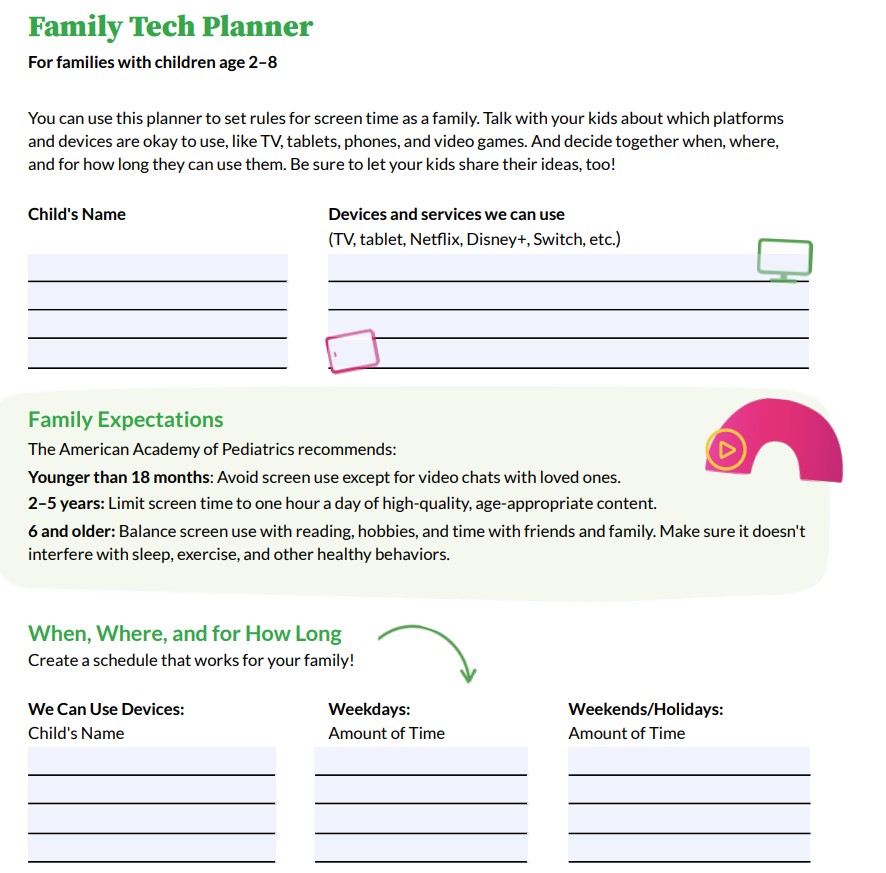 It's easier to set norms before habits form. Take the start of the school year or when a family member gets a new device as time to establish age appropriate boundaries and expectations with tech.
- Take an evening together as a family to all create a tech plan for themselves, parents too! Find a tech plan to fill out for all age groups here: Family Tech Plans
- Each family is different so be sure to think about whether there is anything not captured in the templates provided or if there are things that don’t apply for your family
- Remember this is a growing and living document that helps to keep handy and revisit as kids grow
-
We all want to keep our kids safe and healthy. Parental controls and screen time or app limits can help reduce risks or adverse effects your child may encounter while using their device
Things to Consider Using:
- Downtime hours: Locks most apps during set hours
- App Limits: Caps daily time on chosen apps
- Content filters: Restricts content by age rating
- Purchase approvals: requires your ok before downloads or purchases are made
Tip: set it up together with your child when possible, so it's a partnership and not surveillance
Device Based Guides and Info:
Site or App Based Guides and Info:
Common Sense Media Guides & Info:
Parent’s Ultimate Guides Common Sense Media
Includes articles going in depth on more than just the how-to’s
- Roblox
- TikTok
- Discord
- Snapchat
- YouTube
- Apple Devices
- And more!
-
Kids notice what we do more than what we say. When we put our phones down, they see that it's possible. You don't need to be perfect. Just let your kids see you trying.
Pick one habit to try as a family this week
- Put the phone down
- Phone-free meals, for everyone at the table
- Charge devices outside the bedroom, yours too
- Put your phone away during conversations, and say why: “I’m putting my phone away so I can focus on you.”
- Hold everyone to the same rules
- Add yourself to the family tech plan from section 1
- Follow the rules you set, like downtime hours and notification limits
- Invite your kids to call you out. If phones go in a basket at dinner, yours goes in too.
- Show your skills and your slip-ups
- Let the kids see you turn off a notification, use Focus mode, or check your own Screen Time
- Name it when you slip, then reset: “I got distracted by my phone, sorry.”
- Share what you notice: “I spent more time scrolling than I wanted to today.”
Go Deeper
- Put the phone down
-
Parental controls are one piece. The bigger goal is a child who can notice how tech affects them and make their own choices. Try these together. Most adults haven't explored these settings either, so learning side by side works well. Many apps are designed to hold our attention, so building these skills takes practice for kids and adults.
Try it together (15 minutes): Pick a calm time and sit side by side with your phones. Start with your own device. Kids are more open when you go first. Try steps 1 to 3, then talk through step 6.
Set up your phone:
- Quiet the notifications, then choose your priorities
- Turn off alerts that aren't essential. Start with just one app.
- Choose your priority notifications: the people and apps that can always reach you, like family, a coach, or a ride. Everything else can wait.
- Try scheduled summaries so non-urgent alerts arrive in a batch instead of one at a time.
- What to say: "Who or what should always get through? What can wait until later?"
- Set up Focus modes for different parts of your day
- A Focus mode (iPhone) or Do Not Disturb, Bedtime, or similar mode (Android) quiets alerts and can change what your phone shows.
- Your day isn't the same every day, so your phone doesn't have to be either. Try a mode for school, one for homework, one for sleep, and one for weekends or days off.
- Many phones can switch modes on a schedule or by location, like turning on School mode at school or Sleep mode at bedtime. They can also show a different home screen(s) for each mode.
- What to say: "What do you need from your phone during school? At home? On a Saturday?"
- Simplify your first screen
- Keep the first screen minimal: only the few apps you use on purpose.
- Move social media and games to the last page or into a folder, so opening them takes an extra step.
- Use widgets to check what you need without opening an app, like the weather, your calendar, or the next assignment due. You get the information and skip the scroll.
- Switch the screen to a monotone color wash like grayscale or your favorite color. A less busy and bright screen is less tempting and easier on the eyes.
- What to say: "What do you actually need on your first screen? What's there out of habit?"
- Check in with yourself
- Do an app audit
- Scroll through the apps together and ask:
- Do I open this on purpose?
- Do I feel better or worse afterward?
- Would I miss it if it was gone?
- Then keep it, limit it, or delete it. Let your child make the call on at least one app.
- What to say: "Which app do you wish you used less?"
- Look at your useage together
- iPhone: Settings > Screen Time.
- Android/Google: Settings > Digital Wellbeing.
- Look at total time, pickups per day, and the top three apps.
- Check the weekly usage report to see how your habits change over time.
- Share your own numbers first. Start with curiosity, not judgment.
- What to say: "Does this match what you thought? Anything surprise you?"
- Notice how you feel
Encourage your child to notice their mind and body when they use devices. Common Sense Media suggests asking, "How do you feel after being online? Tired, happy, grumpy, anxious?" Try these prompts:
- After I use this app, do I feel energized, drained, anxious, connected, or left out?
- Did I mean to open it, or did I just reach for it?
- What was I doing right before I picked up my phone?
- Would I choose to spend this time this way again?
If the answer is often "drained" or "left out," that's useful information, not a failure. It's a cue to change something small.
- Build in tech breaks and device-free spaces
- Pick a time or place that's device-free for everyone, like meals, the car, or the hour before bed.
- Charge phones outside the bedroom, yours too.
- Plan an offline activity to replace the scroll: a walk, a game, cooking, a sport.
- Let your child help choose the break. They'll follow a plan they helped build.
- What to say: "What would you rather be doing with that hour?"
Pick just one to try each week. Small changes are the ones that stick. Check in after a week and talk about how it went.